
Get Your Salesforce Emails into the Inbox
SMTP Relay connects your Salesforce org to SendGrid, Mailgun, Office365 or any SMTP server. Better deliverability, and full control over your email.
Read the transcript
Sending email from Salesforce? Give it a better route. Meet SMTP Relay. Connect Salesforce to the mail provider you already use. SendGrid, Mailgun, Office 365. Your server. Your sender name. No extra via Salesforce labels. Encrypted connections. More control. And setup takes minutes. Ready for a smoother send? Start your SMTP Relay trial.
Why Companies Use SMTP Relay
Improve email deliverability
Salesforce's shared sending reputation can land your emails in spam. Route through your own authenticated mail server for better inbox placement.
Remove "via" and "on behalf of" labels
Recipients see "sent via Salesforce" or "on behalf of" when Salesforce delivers email. SMTP Relay removes those labels so emails look like they came directly from you.
Use your own mail server with Salesforce
Salesforce doesn't support authenticated SMTP servers natively. SMTP Relay bridges the gap so you can use SendGrid, Mailgun, Office365, or any SMTP server.
How It Works
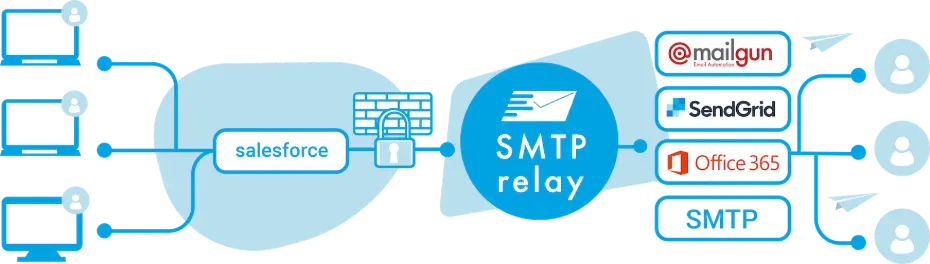
SMTP Relay securely sits between your Salesforce org and a third-party mail server. It checks and maps all outgoing messages, ensuring the best delivery for your email.
Features
Better deliverability
Use your own mail server or a managed premium service to increase deliverability. Get your messages in the inbox.
Remove branding labels
Remove "via" in Gmail and "on behalf of" in Outlook when sending emails from within Salesforce.
Use your own email server
Use your own mail server such as SendGrid, Mailgun, or Office365 to send emails from Salesforce.
Encrypted connections
Use TLS/SSL connections between Salesforce, SMTP Relay, and your mail server.
SPF, DKIM & DMARC
Get the best deliverability rate by using the latest email authentication best practices.
Simple installation
No access to your Salesforce organization is required. Switching can be done within minutes.
Sender-based routing
Route emails to different SMTP servers based on the sender domain. Perfect for multi-brand organizations.
Custom header mapping
Modify and map email headers in transit to meet your mail server's requirements.
Multiple orgs
Manage multiple Salesforce orgs from a single account. Add extra relays as your organization grows.
Works With
 Office365 integration with Salesforce
 Mailgun integration with Salesforce

and all other SMTP email servers
Plans and Pricing
All plans come with a 14-day trial period and are based on company size and usage:
Pro
For a single org. Ideal for small companies.
- Use any authenticated SMTP server
- Up to 500 messages per day
- Unlimited senders
- Extra relays/orgs $109 each
Business
For larger orgs. Best choice for larger companies.
- All features of the Pro plan
- Up to 10K messages per day
- Includes 3 relays/orgs
- Custom header mapping
- Select relay based on sender domain
- Extra relays/orgs $179 each
Custom / Enterprise
If you need more or have custom requirements.
- Send over 500,000 emails per month
- Other payment options than credit-card
- SLA